Risk assessment form
Where: Risks and Compliance › Risk Assessment › Add Risk Assessment, or click a risk · Screen: /dashboard/risk/<id>/edit
Add Risk Assessment opens a short AI-assisted wizard: attach a photo or PDF and/or describe the risk, AI drafts the assessment, and you review it step by step before saving. Clicking an existing risk opens the full form below, with the same fields in seven sections and a Risk Snapshot panel that updates as you type.
Save Draft keeps your work without checking mandatory fields (the risk is marked as a draft). Save & Assess Risk (or Save Changes when editing) checks every mandatory field and lists anything missing.
How the score works: each Likelihood and Severity value has a position on the scale (1 = lowest). Risk score = Likelihood position × Severity position, and the score falls into a level — on the default 5×5 matrix: Low 1–4, Medium 5–9, High 10–16, Critical 17–25. Your Org Admin can change the matrix size and the bands under Settings › Risk Matrix.
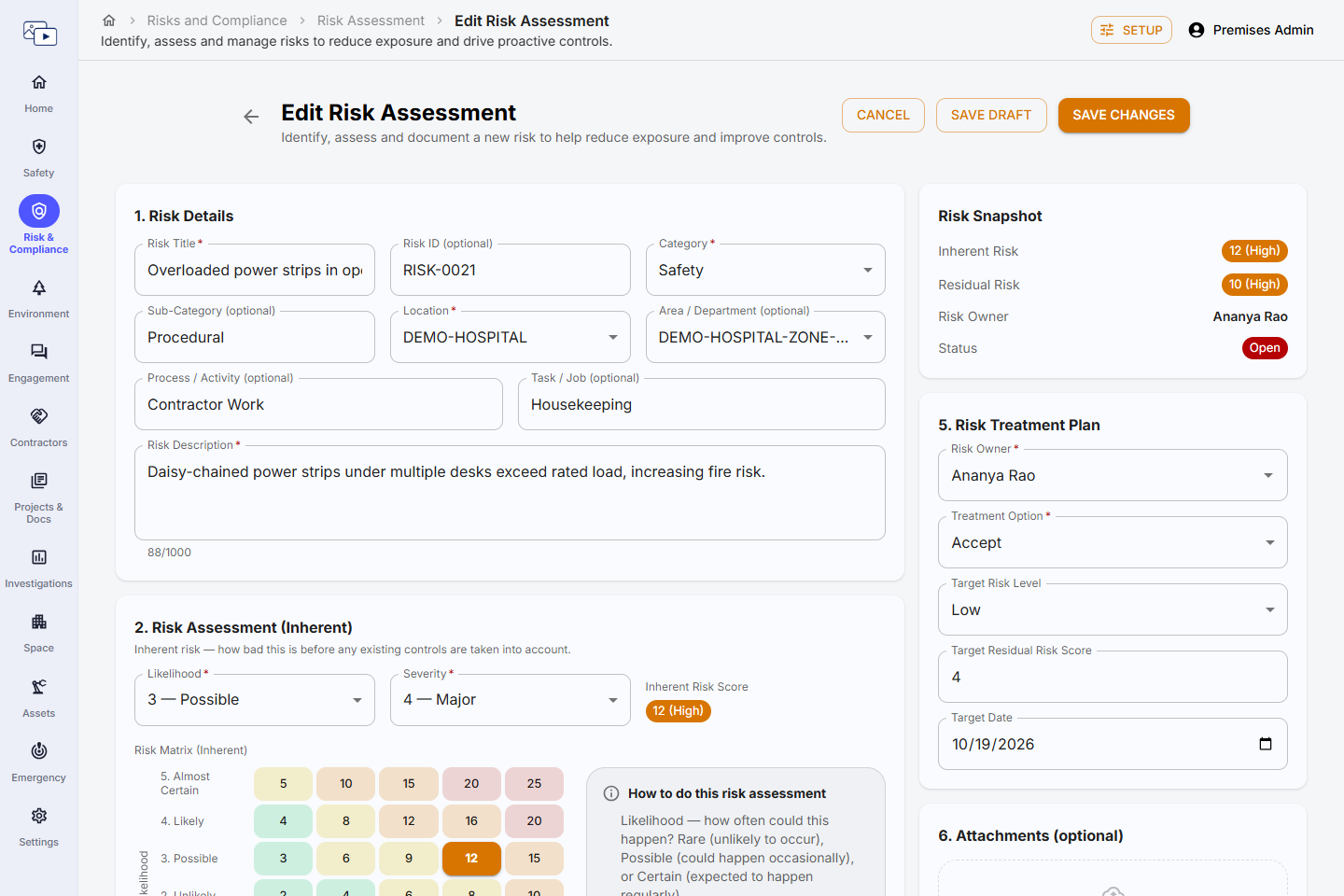
1. Risk Details
| Field | Description | Mandatory | Type / allowed values | Sample value |
|---|---|---|---|---|
| Risk Title | Short, specific name for the risk. | Yes | Text | Forklift and pedestrian conflict at Dock 3 |
| Risk ID (optional) | Your own reference number, if you use one. The app also shows its own Risk ID (RISK-xxxx). | No | Text | HIRA-WH-014 |
| Category | Main type of risk. | Yes | One of: Safety, Health, Environment, Compliance, Operational, Other | Safety |
| Sub-Category (optional) | Finer grouping within the category. | No | Text | Material handling |
| Location | Site the risk belongs to. Filled in for you if there is only one. | Yes | A site you can access | Pune Plant |
| Area / Department (optional) | Zone, area or department within the site. | No | A zone of the selected site, or None | Warehouse |
| Process / Activity (optional) | The process or activity that creates the risk. | No | Text | Loading and unloading |
| Task / Job (optional) | The specific task or job. | No | Text | Pallet movement by forklift |
| Risk Description | What could go wrong, how, and who could be harmed. | Yes | Text | Forklifts cross the pedestrian walkway with no barrier or signage; a pedestrian could be struck. |
2. Risk Assessment (Inherent)
Inherent risk — how bad this is before any existing controls are taken into account.
| Field | Description | Mandatory | Type / allowed values | Sample value |
|---|---|---|---|---|
| Likelihood | How often could this happen? | Yes | Depends on your Risk Matrix size — 5×5: Rare, Unlikely, Possible, Likely, Almost Certain · 4×4: Rare, Unlikely, Likely, Almost Certain · 3×3: Rare, Possible, Almost Certain | Likely |
| Severity | How bad would the outcome be if it did happen? | Yes | Depends on your Risk Matrix size — 5×5: Insignificant, Minor, Moderate, Major, Catastrophic · 4×4: Minor, Moderate, Major, Catastrophic · 3×3: Minor, Moderate, Major | Major |
| Inherent Risk Score | Likelihood × Severity, with its level. Shown on the Risk Matrix (Inherent) next to it. | Automatic | Number — calculated | 16 (High) |
3. Existing Controls
One row per control already in place. Add Control for more rows; the bin icon removes a row.
| Field | Description | Mandatory | Type / allowed values | Sample value |
|---|---|---|---|---|
| Existing Control | A control that is already in place today. Rows left empty are ignored. | No (empty rows are ignored) | Text | Speed limit of 10 km/h for forklifts |
| Effective | How well the control works in practice. | Yes, for each control entered | One of: Effective, Partially Effective, Ineffective | Partially Effective |
4. Risk Evaluation (Residual)
Residual risk — what remains after the existing controls above. If it is no lower than the inherent risk, the controls are not reducing it.
| Field | Description | Mandatory | Type / allowed values | Sample value |
|---|---|---|---|---|
| Likelihood (Residual) | Likelihood with the existing controls in place. | Yes | Depends on your Risk Matrix size — 5×5: Rare, Unlikely, Possible, Likely, Almost Certain · 4×4: Rare, Unlikely, Likely, Almost Certain · 3×3: Rare, Possible, Almost Certain | Possible |
| Severity (Residual) | Severity with the existing controls in place. | Yes | Depends on your Risk Matrix size — 5×5: Insignificant, Minor, Moderate, Major, Catastrophic · 4×4: Minor, Moderate, Major, Catastrophic · 3×3: Minor, Moderate, Major | Major |
| Residual Risk Score | Residual Likelihood × Residual Severity. | Automatic | Number — calculated | 12 |
| Risk Level (Residual) | Level of the residual score on your risk matrix. | Automatic | Low, Medium, High, Critical — calculated | High |
| Risk Acceptable? | Can the organization accept the residual risk as it is? | Yes | Yes / No | No |
| Justification (if Yes) | Why the residual risk is acceptable. Shown when you answer Yes. | No | Text | Area is fenced and used only on night shift. |
5. Risk Treatment Plan
| Field | Description | Mandatory | Type / allowed values | Sample value |
|---|---|---|---|---|
| Risk Owner | Person accountable for treating and reviewing the risk. | Yes | An existing user | Anita Desai |
| Treatment Option | Avoid (stop the activity), Reduce (add controls), Transfer (e.g. contract or insure) or Accept. | Yes | One of: Avoid, Reduce, Transfer, Accept | Reduce |
| Target Risk Level | Level you aim to bring the risk down to. | No | One of: Low, Medium, High, Critical | Low |
| Target Residual Risk Score | Score you aim to reach. | No | Number | 4 |
| Target Date | Date by which the target should be reached. | No | Date | 31-12-2026 |
6. Attachments (optional)
| Field | Description | Mandatory | Type / allowed values | Sample value |
|---|---|---|---|---|
| Attachments | Drag & drop or Browse Files — photos, method statements, permits, etc. | No | JPG, PNG, PDF, DOC, XLS — up to 10 MB each | dock3-layout.pdf |
7. Additional Information
| Field | Description | Mandatory | Type / allowed values | Sample value |
|---|---|---|---|---|
| Risk Identified By | Who identified the risk. Defaults to you. | Yes | An existing user | Priya Nair |
| Identification Date | When the risk was identified. Defaults to today; the dashboard's Duration filter uses this date. | Yes | Date | 09-10-2026 |
| Review Frequency | How often the risk should be reviewed. | No | One of: Fortnightly, Monthly, Quarterly, Half-Yearly, Annually | Quarterly |
| Next Review Date | When the next review is due. Reminder emails go to the risk owner (Settings › Reminders) and the risk counts as overdue after this date. | No | Date | 09-01-2027 |
| Risk Appetite | How much of this kind of risk the organization is willing to pursue. | No | One of: Low, Medium, High | Low |
| Risk Tolerance | How much variation from the appetite the organization can live with. | No | One of: Low, Medium, High | Medium |
| Tags (optional) | Keywords that group related risks. The dashboard's Top Risk Drivers counts these. | No | Free text — type and press Enter | forklift, traffic management |
| Status | Shown when editing. A new risk starts as Open (or the first workflow stage). | When editing | Open, In Progress, Under Review, Closed — or, with a workflow, the stages you can move it to | In Progress |
Risk Snapshot
The panel on the right of the form shows the Inherent Risk, Residual Risk, Risk Owner and Status as you fill them in, so you can see the effect of your controls before saving.