Incident details
Where: Safety Management › Incidents › click an incident · Screen: /dashboard/incidents/<id>/edit
Opens when you click an incident in the list (or the Open button in a notification email). Everything about one incident is on this page.
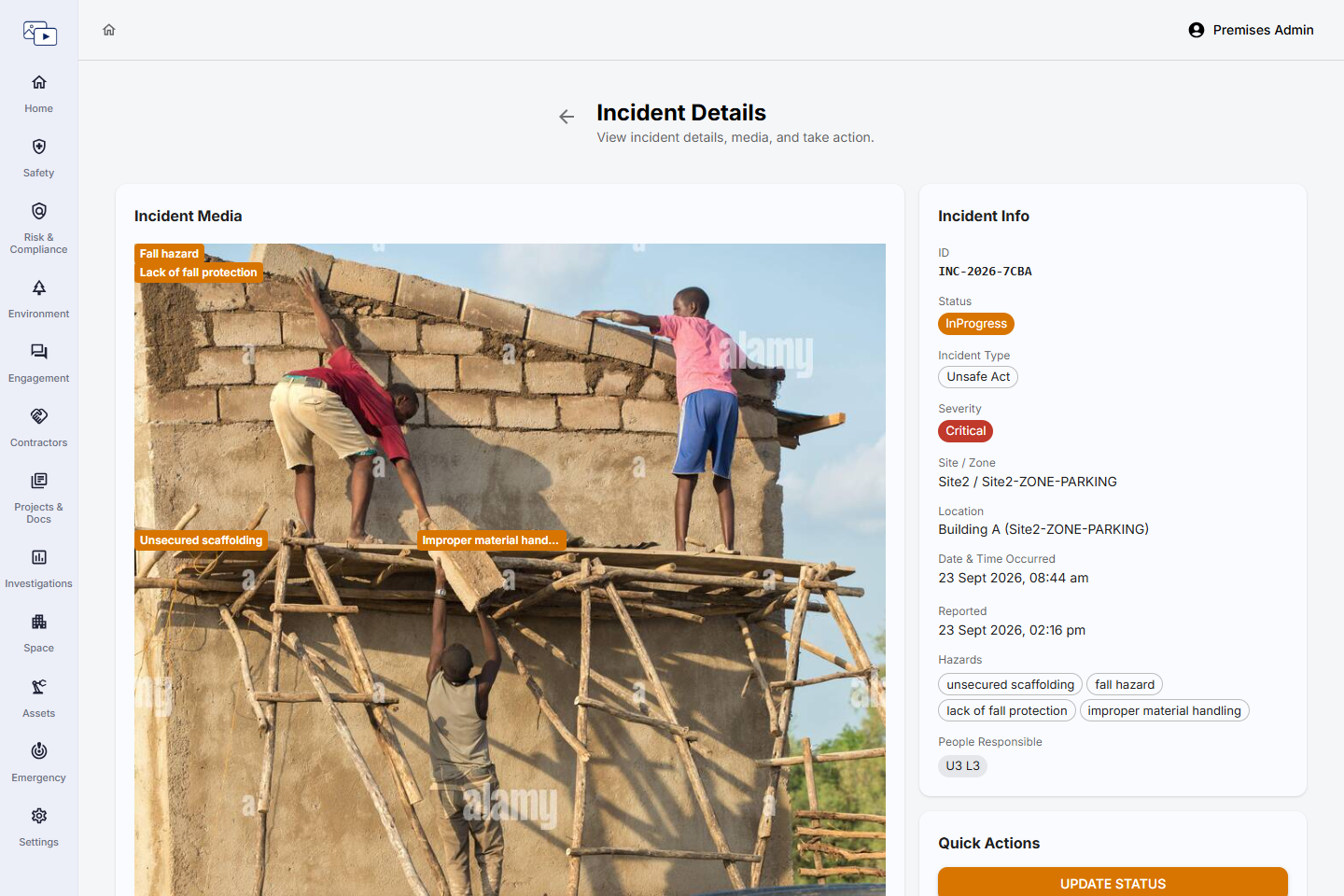
Incident Info
Read-only summary of what was reported. Rows without a value are hidden (camera-raised incidents fill in fewer of them).
| Field | Description | Mandatory | Type / allowed values | Sample value |
|---|---|---|---|---|
| ID | Incident number, e.g. INC-2026-3F9A. Hover to see the full internal ID. | Automatic | Generated | INC-2026-3F9A |
| Status | Current status or workflow stage. | Automatic | Open, In Progress, Closed, Abandoned — or your workflow's stage names | In Progress |
| Incident Type | As reported. | From the report | One of: Near Miss, Unsafe Act, Unsafe Condition, Property Damage, Fire and Explosion, Environmental Incident, Security Incident, Equipment Failure, Vehicle Incident, Other | Unsafe Act |
| Severity | As reported or as assessed by AI. | From the report | One of: Critical, High, Medium, Low | High |
| Site / Zone | Where it happened. | From the report | Site and zone | Pune Plant / Warehouse |
| Location | Finer location inside the zone, if one was picked. | From the report | Text | Block A › Floor 2 › East Wing |
| Date & Time Occurred | When it happened. | From the report | Date | 09-10-2026 10:45 |
| Reported | Who raised it and when. | Automatic | Person and date/time | Priya Nair · 09-10-2026 11:02 |
| Injury Case(s) | Injury cases linked to this incident, with their status. Click one to open it in Injury Cases. | Automatic | Links | Injury: Suresh Patil (Open) |
Incident Media
The photo attached when the incident was raised (for a camera incident, the camera's image or clip). Hazards detected by AI are drawn as labelled boxes on the image; for a video, the Detected Hazards list lets you jump to the moment each hazard appears. Incidents reported by description only show No photo attached — reported by description only.
Comments
The incident's history: the reporter's first comment (As reported) and every status update, each with who made it, when, and any evidence photo attached.
Quick Actions
- Update Status — Move the incident on (for example from Open to In Progress, or Closed) with a comment and optional evidence photo — see below.
- View AI Analysis & Recommended Actions — Shown when AI analysed the incident and you have access to Review & Investigation. Shows the AI analysis, immediate action, regulation and recommended actions, where each action's owner can update it. Go to Review & Investigation opens the full investigation.
- Log Injury Case — Shown to users with access to Injury Cases. Records an injury against this incident after it was raised.
Update Incident (Update Status)
| Field | Description | Mandatory | Type / allowed values | Sample value |
|---|---|---|---|---|
| Status | New status. With a workflow, some moves need approval first; the incident shows the pending move until it is approved. | Yes | Open, In Progress, Closed, Abandoned — or, with a workflow, the stages you are allowed to move it to | Closed |
| Enter Comments | What was done / why the status is changing. Added to the Comments history. | No | Text | Harness issued and toolbox talk held on 10-10-2026. |
| Attach evidence photo (optional) | Proof of the work done, e.g. a photo of the fixed hazard. | No | Photo (JPG/PNG) | harness-issued.jpg |
Update Action
Opened by clicking the status chip next to a recommended action in the AI Analysis window.
| Field | Description | Mandatory | Type / allowed values | Sample value |
|---|---|---|---|---|
| Status | Progress of the action. | Yes | Open, In Progress, Complete | Complete |
| Enter Comments | Update on the action. | No | Text | Toolbox talk done for 3 crews. |
| Attach evidence photo (optional) | Proof the action was done. | No | Photo (JPG/PNG) | toolbox-talk.jpg |