Raise an incident
Where: Safety Management › Incidents › Raise Incident · Screen: /dashboard/org/all (Raise Incident button)
Raise Incident opens a step-by-step form. Start by attaching a photo, or by describing what happened — AI reads it and fills in as much of the form as it can (hazards, severity, how it happened, recommended actions). You then check every step, correct anything that is wrong, tick the confirmation box and move on. Prefer to type everything yourself? Choose Skip AI Analysis — Enter Manually.
You can go Back to any earlier step at any time. Next only lets you continue when the current step's mandatory fields are filled in; the form lists anything missing in red.
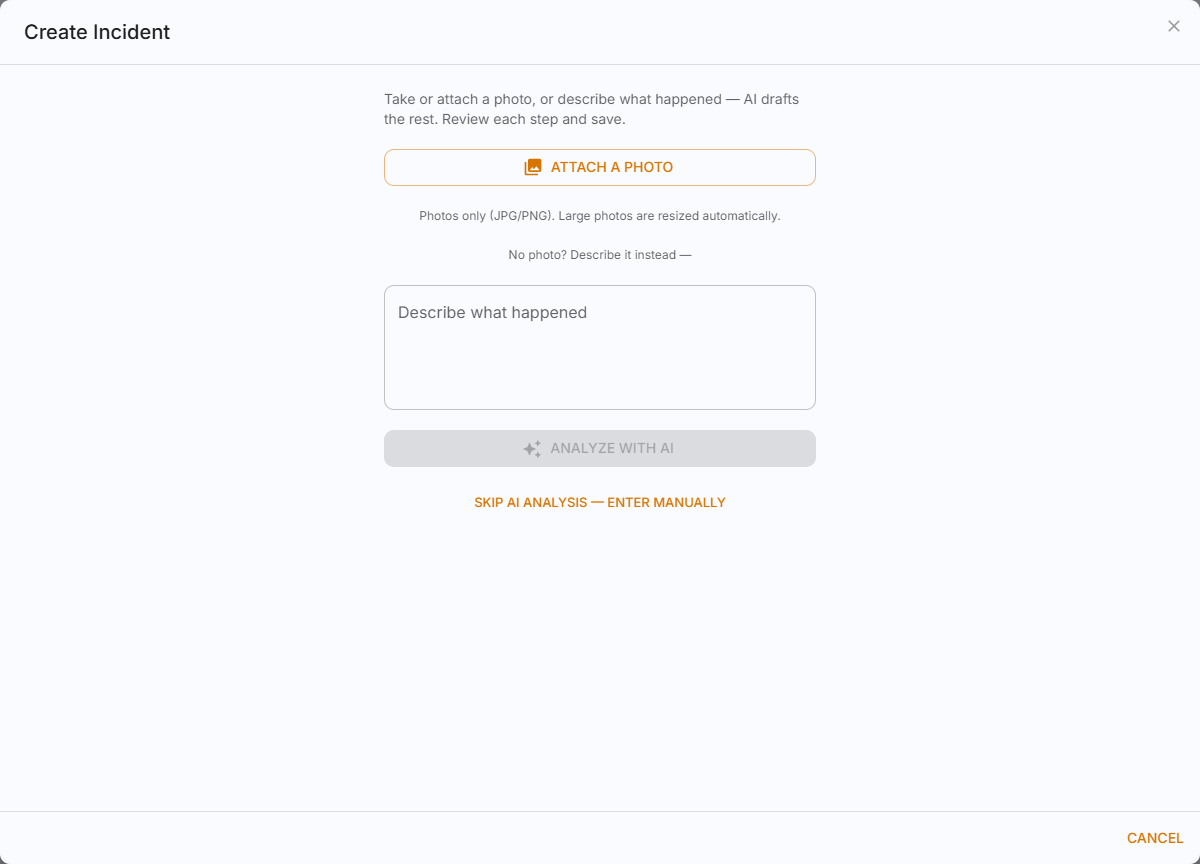
Start: photo or description
Use one of these to let AI draft the incident. All are optional — you can skip straight to entering it manually.
| Field | Description | Mandatory | Type / allowed values | Sample value |
|---|---|---|---|---|
| Take Photo / Choose from Gallery / Attach a Photo | Evidence of what happened. Large photos are resized automatically. The file is kept with the incident. | No | Photo (JPG/PNG) up to 10 MB | IMG_2041.jpg |
| Describe what happened | Used when there is no photo, or to add context to one. AI reads it to fill in the steps. | No | Text | Worker on the 3rd floor scaffold without a harness near the east stairwell. |
Click Analyze with AI. If AI cannot finish, fill in the steps manually or press retry.
Step 1 — Report Details
| Field | Description | Mandatory | Type / allowed values | Sample value |
|---|---|---|---|---|
| Site | Site where it happened. Filled in for you if you belong to one site, or the organization has only one. | Yes | A site you can access | Pune Plant |
| Zone | Zone of the site where it happened. Filled in for you if the site has only one zone. | Yes | A zone of the selected site | Warehouse |
| Location within the zone | Optional finer location, if your admin has set up the site structure. | No | Building › Floor › Wing / Space, as set up for the site | Block A › Floor 2 › East Wing |
| Incident Type | What kind of incident this is. Whether anyone was hurt is asked separately in step 2. | Yes | One of: Near Miss, Unsafe Act, Unsafe Condition, Property Damage, Fire and Explosion, Environmental Incident, Security Incident, Equipment Failure, Vehicle Incident, Other | Unsafe Act |
| Date & Time Occurred | When it actually happened (may be earlier than when you report it). | Yes | Date and time | 09-10-2026 10:45 |
| Hazards | The hazards involved. AI fills these in from the photo or description. | Yes | Pick from your organization's hazard list, or type your own (separate several with commas) | No harness, Working at height |
| Severity | How serious the incident is. Shown to users with access to Review & Investigation; AI suggests the highest severity among the hazards it found. | No | One of: Critical, High, Medium, Low | High |
| Comments | Anything else the reviewers should know. Saved as the first comment on the incident. | No | Text | Supervisor informed on the spot. |
| People Responsible | Who was involved or responsible. Pick No one if nobody was. | Yes | Existing users (name or role), or "No one" | Ravi Kumar |
| I have reviewed and verified the report details above. | Confirmation tick-box — required to continue. | Yes | Tick box | ✓ |
Step 2 — Injury / Illness
Answer Was anyone injured or did anyone become ill? If Yes, fill in one block per injured person (Add another injured person for more). Each block becomes an Injury Case linked to this incident.
| Field | Description | Mandatory | Type / allowed values | Sample value |
|---|---|---|---|---|
| Was anyone injured or did anyone become ill? | Choose Yes to record injury details. | Yes | No, Yes | Yes |
| Employee Type | Whether the person is your own employee or a contractor. | Yes, if injured | One of: Company, Contractor | Company |
| Injured Person | Name of the injured person. | Yes, if injured | Name | Suresh Patil |
| Injury Type | Nature of the injury. | Yes, if injured | One of: Cut/Laceration, Fracture, Sprain/Strain, Burn, Bruise/Contusion, Eye Injury, Other | Sprain/Strain |
| Body Part | Part of the body affected. | No | Text | Left ankle |
| Severity (OSHA Classification) | Outcome of the injury, using the OSHA classification. Lost Time and Fatality cases reset the Safe Manhours counter. | Yes, if injured | One of: First Aid Only, Medical Treatment, Restricted Work, Lost Time, Fatality | First Aid Only |
| Treatment Given | First aid or medical treatment given. | No | Text | Cold compress and crepe bandage |
| Attended By | Who gave the treatment. | No | Text | First aider — A. Shaikh |
| Injury / Illness Description | What the injury or illness is and how it happened. | Yes, if injured | Text | Twisted ankle stepping off the scaffold ladder. |
| I have reviewed and verified the injury/illness information above. | Confirmation tick-box — required to continue. | Yes | Tick box | ✓ |
Step 3 — Assessment
Steps 3 and 4 appear only for users with access to Review & Investigation. Others skip them; AI still saves its analysis with the incident.
| Field | Description | Mandatory | Type / allowed values | Sample value |
|---|---|---|---|---|
| Regulation (if applicable) | Law, standard or rule that applies, if any. AI suggests one. | No | Text | Factories Act 1948, Sec. 32 |
| AI Summary | Short summary of the incident, drafted by AI. Edit it if it is wrong. | No | Text | Worker at height without fall protection. |
| How It Happened | Sequence of events leading to the incident. | Yes | Text | Harness was left in the site office; the worker climbed to finish a quick task. |
| Immediate Action | What was done straight away to make the situation safe. | No | Text | Work stopped; worker brought down and briefed. |
| I have reviewed and verified the AI-generated assessment above. | Confirmation tick-box — required to continue. | Yes | Tick box | ✓ |
Step 4 — Recommended Actions
Corrective and preventive actions suggested by AI. Edit, remove or add rows. Each action is tracked on the incident and in Review & Investigation.
| Field | Description | Mandatory | Type / allowed values | Sample value |
|---|---|---|---|---|
| Action | What needs to be done. | No | Text | Toolbox talk on fall protection for all scaffold crews |
| Type | Corrective fixes this incident; Preventive stops it happening again. | No | Corrective, Preventive | Preventive |
| Owner | Person responsible for the action. They are notified. | No | An existing user | Anita Desai |
| Due | Date the action should be completed by. | No | Date | 20-10-2026 |
| Priority | How urgent the action is. | No | Critical, High, Medium, Low | High |
| I have reviewed and verified the recommended actions above. | Confirmation tick-box. | No | Tick box | ✓ |
Press Save on the last step. The incident is created with status Open (or the first stage of your incident workflow) and the people concerned are notified.